

This use case is for sell-side institutional traders looking to achieve Best Execution by leveraging the Execution Algo Suite. In a market where success depends on deploying the right strategy, this document presents a practical scenario for a common trading challenge. It illustrates the complete workflow—from profiling an order and selecting the optimal algorithm for a specific objective (like minimizing market impact or prioritizing speed), to configuring its key parameters for precise execution.
Example Use Case: Choosing the Right Algorithm
The primary challenge for sell-side traders is determining the optimal algorithm for their order’s objective. Here is a comparison of four possible scenarios:
Use Case 1: Minimize Market Impact
- Scenario/Goal: Executing a large, complex order that is equivalent to 40% of the daily average volume, with the goal of hiding size and achieving a price close to the end-of-day VWAP.
- Recommended Algo: Scheduled (VWAP or TWAP)
- Why it Works: These algorithms slice the order into small, passive components and strategically tap dark liquidity pools. They pace the order execution over time to ensure that your presence doesn’t move the market price against you.
Use Case 2: Maximize Execution Speed
- Scenario/Goal: Executing a time-sensitive order with an aggressive stance to capture a favorable price instantly.
- Recommended Algo: Price Action – SNIPER or ICEBERG
- Why It Works: A SNIPER-type algo is an aggressive liquidity-seeker designed to execute rapidly at the most favorable price level, while an ICEBERG allows for the order to be posted to the market in a small visible part to minimize disclosure and maximize speed.
Use Case 3: Prioritizing Raw Speed and Simplicity
- Scenario/Goal: Executing a simple order where the priority is raw speed and there is minimal concern for market impact or complex pacing.
- Recommended Strategy: Low-Touch or No-Touch DMA (Direct Market Access)
- Why it Works: For maximum speed and simplicity, the platform is fully automated to handle No-Touch DMA flow without direct user intervention. The SDMA (Smart DMA) algo can be layered on top to ensure even these direct orders are intelligently adapted to specific exchange microstructures, optimizing execution without sacrificing speed.
Use Case 4: Participating with Market Volume
- Scenario/Goal: Executing a medium-sized order in a liquid stock by participating alongside natural market volume, without being too aggressive or passive. The goal is to minimize signaling while ensuring the order completes by the end of the day.
- Recommended Algo: TVOL (Target Volume)
- Why it Works: A TVOL algorithm dynamically adjusts its execution rate based on the real-time traded volume in the market. By setting a participation rate (e.g., 10%), your order naturally speeds up when the market is active and slows down during quiet periods, making your execution blend in seamlessly with the natural flow.
Best Practices or Tips: SME Commentary
The Power of Pre-Trade Analytics: How to Select the Optimal Algo for Every Order
Selecting the right execution algorithm is increasingly a data-driven decision, moving beyond simple trial-and-error. For a modern execution desk, the key to optimal execution lies in leveraging intelligence before the order even hits the market.
However, a purely data-driven approach has its limits. We asked our COO, Dino Dedic, to share his perspective on finding the right balance.
“Pre-trade analytics and data are a fantastic starting point, but you can’t rely on them alone. What works in one market may fail in the other. Trader intuition and a deep understanding of different market specifics are just as critical. The key isn’t just having smart analytics; it’s having a highly configurable and moldable algorithm. A trader needs to be able to take that data-driven recommendation and then adjust it based on their own experience and the unique microstructure of the specific venue they’re trading on. That’s where the real edge comes from—the combination of data, experience, and an adaptable tool.”
Overview of the Product: The MTP Algo Suite
The Execution Algo Suite is an advanced engine of highly configurable, high-performance execution algorithms, engineered to give traders a decisive competitive edge when executing complex orders. At its core, the suite is built for:
- Precision and Performance: Algorithms are engineered to manage market impact, minimize gaming, and execute large order quantities while striving to beat performance benchmarks.
- Breadth of Strategy: The suite offers a vast array of algorithms covering various market needs, including:
- Schedule-Based Algos: Such as VWAP and TWAP.
- Volume-Driven Algos: Including TVOL.
- Liquidity/Price Action Algos: Such as ICEBERG, SNIPER, PEG, and DPL (Dark Pool Liquidity).
- Adaptability and Control: Each algorithm is highly configurable, offering users access to over 100 trader parameters for bespoke parameterization to align with a specific client’s strategy.
Step-by-Step Guide to Algo Execution on Our Platform
The process of executing an order using an algo is streamlined through the Marvelsoft Trading Platform interface, primarily via the Parent Order Entry and the Execution View.
Phase 1: Order Initiation and Algorithm Selection
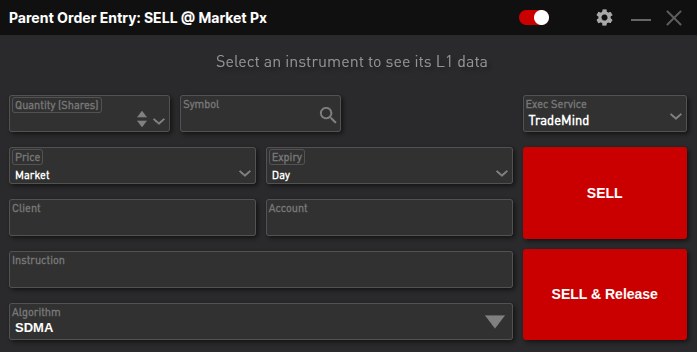
- Access Order Entry: Navigate to the main application toolbar and select Parent Order Buy or Parent Order Sell.
- Input Core Details: Enter the required order parameters: Quantity, Symbol, Price (if Limit order), and Expiry (Time-In-Force).
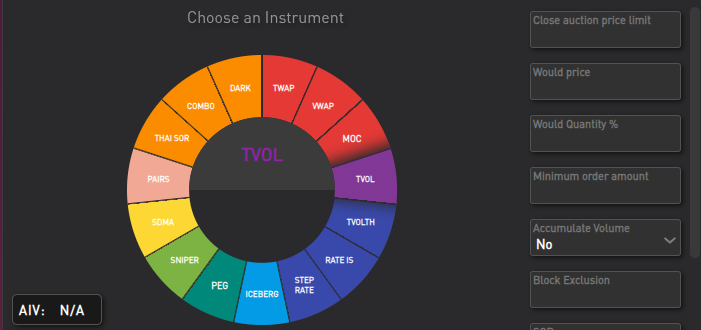
- Select Algorithm: Use the circular instrument selector within the Parent Order Entry to choose the desired algorithm (e.g., VWAP, TWAP, ICEBERG). SDMA (Smart Direct Market Access) is the default choice for low-touch flow.
- Optional Parameterization: Before release, adjust the 100+ available parameters to fine-tune the algo’s behavior for that specific order. For instance, you can set the maximum price limit, target participation rate, or anti-gaming logic. Note that intelligent defaults are in place, allowing immediate trading without mandatory parameter input.
- Release Order: Click BUY/SELL & Release to send the order to the execution service. This will create an Algo Order that now appears in the Execution View.
Phase 2: Real-Time Monitoring and Control
Once the order is live, the Execution View becomes your central control panel:
- Access the View: Select Execution View from the Execution Analysis menu on the MTP toolbar.
- Monitor Performance: The view displays all live Algo Orders, filtering them by dedicated tabs (e.g., LIVE, VWAP, ICEBERG). You can track real-time progress, including % Filled, CumQty (Cumulative Quantity Executed), and benchmark performance against metrics like Arrival Price or VWAP.
- Intervene if Necessary: For dynamic control, right-click the Algo Order to access the Context Menu, where you can cancel the order, kill it, or use the release again option, which is used to override safety nets like the AIV Risk Check (Quantity Too Large) or an Arrival Price Check halt.
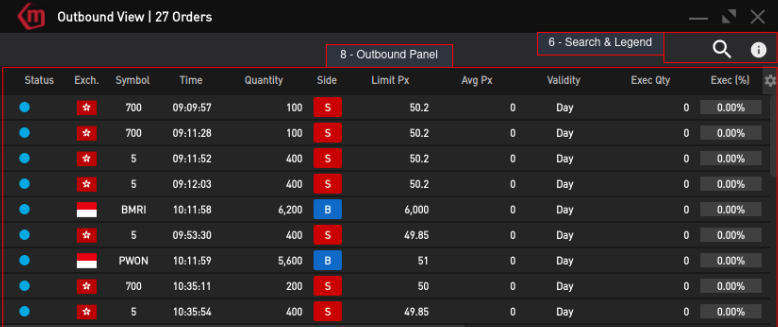
- View Child Orders/Trades: Use the Context Menu to directly open the Outbound View to see the micro-level slices (Outbound Orders) the algo is sending to the market, or the Algo Trade View to review the actual fills.
Measuring Success: Analytics for Algorithm Performance
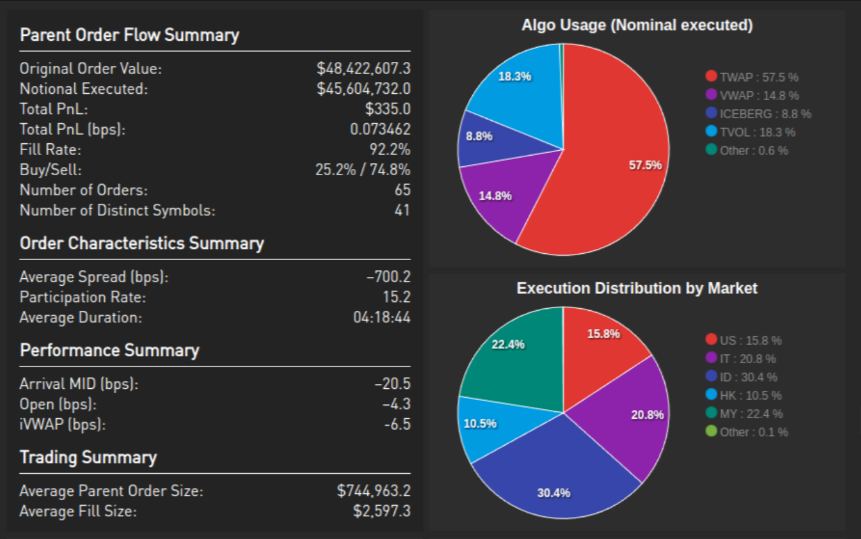
Choosing the right algorithm is only half the battle. The Execution Algo Suite is integrated with a powerful Transaction Cost Analysis (TCA) toolkit, allowing you to measure performance and prove that your execution goals were met.
After executing an order, you can immediately analyze its performance relative to your initial objective.
- For the “Minimize Market Impact” Use Case (VWAP/TWAP): Your primary focus in the analytics dashboard would be on metrics like Price Slippage vs. Arrival and Market Impact. A low or neutral value here provides concrete evidence that the algorithm successfully hid your footprint and preserved the market price.
- For the “Maximize Execution Speed” Use Case (SNIPER): You would analyze metrics like Fill Rate and Time to Completion. The goal is to see a high fill rate accomplished in a very short time frame, confirming the aggressive, liquidity-seeking strategy was effective.
- For the “Participating with Volume” Use Case (TVOL): The key metric to watch would be your Participation Rate. You can verify if the algorithm successfully stayed within your target percentage (e.g., 10%) of the market volume throughout the execution period, proving it blended in as intended.
This feedback loop is essential for refining your strategy over time, turning every trade into an opportunity to learn and optimize for the next one.
Conclusion
The Execution Algo Suite provides sell-side institutions with the precision, control, and adaptability required to achieve Best Execution in any market scenario.
As the use cases in this document demonstrate, by matching the right algorithm to your specific trading objective—whether minimizing impact, prioritizing speed, or participating with volume—your team can consistently optimize strategy and gain a competitive advantage.
Ready to maximize your execution quality? Contact our experts today for a detailed demo and see the Execution Algo Suite in action.